Posts

Blog Post 8

Image
Adaptive technologies are any devices used to assist students with disabilities in the classroom. These devices are specific to each students needs so they can have an equal learning opportunity within the classroom. For example, the podcast lists that students with vision problems can have a device that magnifies text so the student can see more clearly. My grandma is blind and has to use one of the magnifying devices in order to read.  There are devices for visually impaired students that have audio capabilities so that the student can still have the information delivered to them. For physically disabled students there are other tools such as joysticks that the student can use as opposed to using a mouse pad in order to make operating the device simpler. The only challenge I see in using adaptive technologies in my classroom is ensuring that I properly know how to use and operate the device so I can help my student understand how to use it. Another issue could be if the device...
Blog Post 7

Image
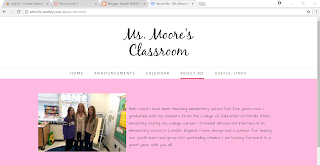
So far my experience with Twitter has been good. I have been able to learn about different technological advances in the classroom from articles that other students have posted. I like following different educational Twitter pages because it allows me to see new additions or changes in the educational world. Benefits of Twitter include being able to collaborate with other whether it be classmates or anyone in the world, you can communicate and share ideas with many people. With Twitter you can also see and learn new things from viewing what people tweet. The biggest problems I have had with Twitter is forgetting to tweet on a weekly basis. Other than that Twitter is very easy to use. I did not like the web page design assignment at first because it was very difficult to navigate the website and figure out how to use the tools. I struggled the most with trying to figure out how to format pictures and texts to look and fit nicely on the page. I learned how to use an embedded goo...

ILP “Tool box” – Communication (Twitter)

https://voicethread.com/share/9752305/ 

Blog Post 6

Image
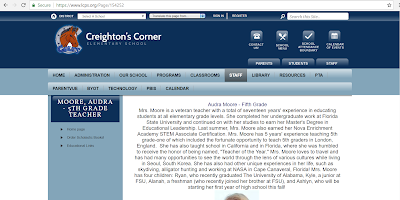
  https://www.lcps.org/Page/154252 I chose to examine the teachers class pages from Creighton's Corner Elementary School. I viewed different class pages from grades K-5th to get an idea of how each grade differed. The screenshot of the class website is a fifth grade teacher at Creighton's Corner. All of the class pages I viewed I was able to see a photo of the teacher along with a paragraph describing the teacher, giving fun facts about themselves, goals for the school year, expressing excitement for the class, etc. I noticed that a lot of the older grade level teachers had multiple links on their page for other educational resources and websites. I was able to click and view these extra links. The fourth grade teachers actually had linked their fourth grade class twitter page to their class page, however the twitter account was on private so I was not able to view this information. I will use technology in my classroom to help enhance communication with the ...

Blog Post 5

I think that Web 2.0 tools that allow students to share their thinking and have other students comment on each others posts in a safe way is the most  constructive use of these technologies. I think that the tools that allow students to share a lot of information is more useful and efficient so they can expand on their ideas and work. This being said, in reference to the podcast, I think that Twitter is the least effective technology. I believe that it does not allow enough space for students to fully express themselves. Diigo is a much for effective tool because like twitter students have the ability to post links to websites, however they have more space to write out their thoughts and explanations for other peers to see. One useful Web 2.0 technology is Storybird ( http://storybird.com/ ) . This is a great website that allows for students to express their creativity and practice their language art skills while creating visual stories online. It is engaging, fun, and easy for s...

Blog Post 4

I have been using twitter to mainly look at other educational organizations posts. I have found it beneficial because it gives me an outlet to see different articles on education. I think that twitter could help me in my future career as a teacher to help send out additional information to students. I could post clarifying assignments or sharing different articles that I find interesting for the class to read. It could be a useful tool for answering students questions because twitter is quick and easy to use. The digital divide affects each student's success differently in the classroom depending on which side of the divide they fall on. If the student does not have consistent access to technology at home than they are at a disadvantage. While there are sometimes other options of getting to technology such as the library, it still makes things more difficult for the child. Some causes of the digital divide is a family's economic status, some students from lower income homes m...

Blog Post 3

With my existing knowledge I feel most prepared to teach the technology standards, "Multimedia Literature". This standard places emphasis on analyzing how different media styles can contribute to a literary piece's meaning and help the reader to understand the text. I feel prepared to teach this standard the most because I have been taught and practiced throughout my educational career a strong focus on the comparison and analysis of different pieces of work and how every bit put into a project is put with a purpose. I believe that because of my experience I would be able to efficiently teach my future students this standard. I fee most unprepared to teach the standard, "Multimedia: Informational Text" because some key elements of this standard include the knowledge of how to input different graphs, animations, and other "interactive elements" which I do not know how to do myself. I would like to use some sort of blogging application such as this one...